

Checking the Status of Your Domain Transfer
Transferring a domain between two registrars takes time. The process requires unlocking the domain, verifying the ownership, and sending the domain to the new registrar which can take anywhere from a few days to a few weeks. Checking on the status of the update shouldn’t be another frustration in the process. With Liquid Web’s new Domain Management tools, checking on the status of your domain transfer is as simple as logging in.
Using portal.liquidweb.com
- Login to your Liquid Web account. For more information on accessing your Liquid Web account, see Exploring Your My Liquid Web Account.
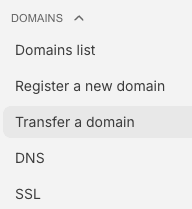
- At the left of the screen, under Domains, click Transfer a domain.
- Any pending domain transfer, either incoming or outgoing, will appear under Domain Transfers. You’ll see the type of transfer, the domain name, the created date, the status, and details of the transfer. You can click on the three dots to the right of the domain to resend an EPP code for an outgoing transfer, or to cancel an order for an outgoing transfer.

For more information about transferring domains, see Transferring Your Domain to Liquid Web or Transferring Your Domain to a Different Registrar